 APIs (2)
 Bulk SMS (19)
 Click to Call (4)
 Cloud Call Center (13)
 WhatsApp Business API (3)
 Cloud Telephony (23)
 DLT (4)
 IVR (5)
 Missed Call (3)
 Mobile Cloud Call Center (2)
 Outbound Calling Service (3)
 Political Campaigns (14)
 Toll Free Number (5)
 Voice Broadcasting Service (14)
 Zoho CRM (1) WhatsApp (31)
 RCS SMS(5)
 LMS(2)
 140 and 1600 Series(8)
 Omnichannel(1)
 AI Solutions(2) APIs (2) Bulk SMS (19) Click to Call (4) Cloud Call Center (13) Whats AppBusiness API (3) Cloud Telephony (23) DLT (4) IVR (5) Missed Call (3) Mobile Cloud Call Center (2) Outbound Calling Service (3) Political Campaigns (14) Toll Free Number (5) Voice Broadcasting Service (14) Zoho CRM (1) WhatsApp (31) RCS SMS(5) LMS(2) 140 and 1600 Series(8) Omnichannel(1) AI Solutions(2)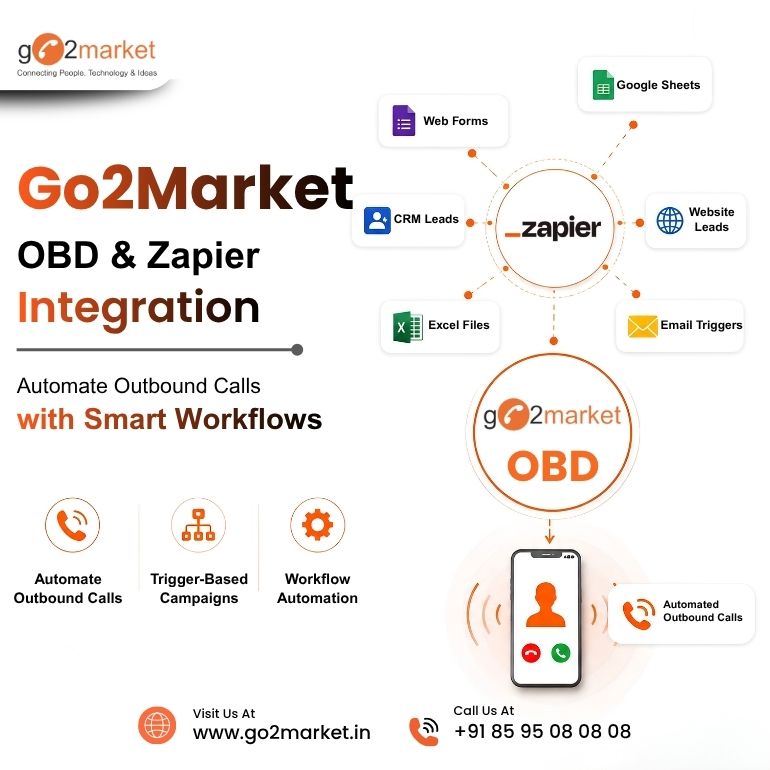
Aug
Businesses often need to send automated voice calls for customer alerts, payment reminders, appointment confirmations, surveys, lead follow-ups, and other notifications. Go2Market’s OBD (Outbound Dialer) service makes it possible to send pre-recorded voice messages to multiple customers automatically.
Instead of manually uploading numbers or initiating every campaign, businesses can connect Go2Market with Zapier and trigger outbound call w orkflows when specific events occur. Read this blog to understand how the Go2Market OBD (Outbound Dialing) and Zapier integration works.
How Does It Work?
Setting up an automated OBD call through Zapier is simple:
1. Generate Your Ukey - The first step is to generate your Ukey, which is used to authenticate and connect your Go2Market account with Zapier.
2. Add Your Audio File - Upload or provide the required pre-recorded audio file that will be played when the call is answered.
3. Add the Mobile Numbers - Enter the MSISDN/mobile numbers on which you want to send the voice call. Go2Market's Zapier action supports an MSISDN list for outbound calling.
4. Configure and Run the Zap - You can configure options such as sending the call immediately or scheduling it, along with campaign and retry settings. Once the trigger occurs in Zapier, the OBD action automatically initiates the voice call.
Zapier connects Go2Market OBD with the apps businesses already use. Once the workflow is configured, a specific action can trigger an outbound calling process.
For example:
The trigger can initiate the relevant OBD workflow, helping businesses respond faster.
Automate Outbound Calls Without Manual Work
Go2Market OBD and Zapier integration helps teams by connecting business events with outbound communication.
Businesses can:
This allows sales and support teams to spend more time on meaningful customer interactions.
Connect OBD with Your Existing Business Apps
Zapier supports connections between thousands of business applications, making it easier to build automated workflows around Go2Market OBD.
Businesses can connect their calling workflows with tools used for:
This creates a connected workflow instead of managing every communication task separately.
The integration can support multiple business communication scenarios.
Lead Follow-Ups
Automatically trigger an outbound call when a new lead enters your system.
Appointment Reminders
Use workflow triggers to initiate reminder calls before scheduled appointments.
Customer Notifications
Trigger calls when customers need important updates or follow-ups.
Sales Workflows
Connect new enquiries or lead-stage changes with automated calling actions.
Support Workflows
Initiate outbound calls when a customer support action requires voice communication.
Why Automate OBD with Zapier?
This integration helps businesses reduce manual calling and automate repetitive communication. For example, a new lead in a CRM, a payment event, or a scheduled reminder can trigger an automated voice call.
Go2Market OBD + Zapier = Simple, Automated Voice Communication.
Connect your workflows, upload your audio, add your numbers and automate your voice calls with Go2Market.
Go2Market OBD and Zapier integration helps businesses turn everyday business events into automated outbound calling workflows. By connecting OBD with CRM, forms, lead management and other business applications, teams can respond faster, reduce repetitive work and make customer communication more efficient.
Whether you need automated lead follow-ups, appointment reminders, customer notifications, Go2Market OBD can become part of a smarter, connected workflow. Connect with Go2Market team @ 85 95 08 08 08 or book demo @ https://go2market.in/request-a-demo
FAQs
1. What is Go2Market OBD and Zapier integration?
It connects Go2Market's outbound calling workflows with business applications through Zapier, allowing calls to be triggered by specific events.
2. Can OBD calls be triggered when a new lead is created?
Yes. A new lead or another configured business event can be used as a trigger for an outbound calling workflow.
3. Do I need coding knowledge?
Zapier is designed for workflow automation, allowing businesses to create integrations without complex coding.
4. What can businesses automate with OBD?
Businesses can automate lead follow-ups, appointment reminders, customer notifications, sales workflows, and other outbound calling processes.
Follow Us